Scary Smash: Unleashing a Spooky SVG Font for Halloween Projects
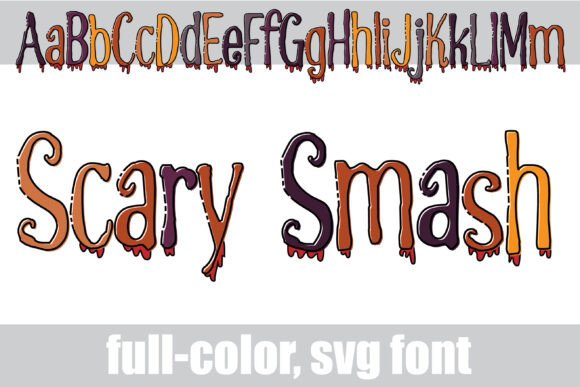
There’s a specific kind of magic that happens when typography meets texture. You can spend hours adjusting kerning and leading, but sometimes a design calls for something visceral—something that looks like it was just pulled from a crypt. If you’ve ever struggled to find a typeface that captures the campy, gooey horror aesthetic of classic slasher films or 90s monster cereals without looking cheap, you know the struggle. Enter Scary Smash, a full-color SVG font that doesn't just suggest a Halloween vibe; it practically bleeds it.
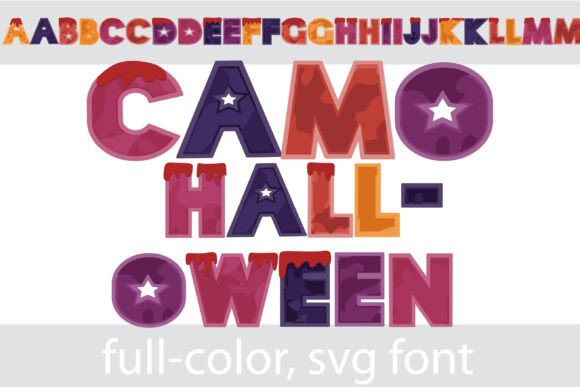
What sets this typeface apart immediately is its construction. It features a fully outlined design dipped in a Halloween color palette, complete with drippy blood effects. But unlike standard vector fonts that rely on flat colors or manual layering to achieve depth, Scary Smash utilizes OpenType SVG technology. This means the texture, the color gradients, and the "wet" look of the blood are baked directly into the font file. When you type "Happy Halloween," you aren't getting a flat outline; you are getting a rich, multi-dimensional image wrapped around each glyph. For designers, this is a massive time saver. It eliminates the need to rasterize text and manually add effects in Photoshop just to get that "horror movie poster" look.
Understanding the Power of Color Fonts
If you haven’t worked with full-color SVG fonts before, there is a slight learning curve, but the payoff in visual impact is worth it. Scary Smash is installed just like any standard .otf file—via FontBook on a Mac or your preferred font manager on Windows. However, because it contains high-fidelity color data, it behaves differently than your standard serif or sans serif font.
It is crucial to understand the compatibility landscape. Currently, full-color fonts show up as solid black blocks in many older or non-compatible programs. This is normal. If you open the font in a program that doesn't support the SVG extension, you will see a silhouette, not the colors. However, if you are using modern creative software—specifically Adobe Photoshop, Illustrator, InDesign, QuarkXPress, Inkscape, or Silhouette Studio—you are in luck. These platforms can read the color data. A pro tip for Silhouette Studio users: this font is fully compatible, making it a dream for physical crafters making decals or iron-on transfers.
There is one quirk to keep in mind when working in compatible software. Sometimes, when you scroll through your font list or look at the preview window, the font might still appear black. Don't panic. The colors often only render once you actually type the text onto your canvas. If you see the colors appear when you type, you know your setup is correct.
Practical Applications for Branding and Marketing
While Scary Smash is obviously a seasonal powerhouse, its utility extends far beyond a single night in October. As a premium font asset, it serves a specific niche of branding that requires high energy and a touch of the macabre.
For small business owners, particularly those in the entertainment, gaming, or party supply industries, this typeface offers immediate brand recognition. Imagine a logo for a haunted house attraction or a local ghost tour. Using a standard script font might look elegant, but Scary Smash looks like an event. It communicates danger, fun, and adrenaline instantly.
Here are a few specific scenarios where this typeface shines:
- Packaging Design: If you are designing labels for craft beers, "poison" apple cider, or Halloween-themed snacks, the dripping blood effect adds a tactile, visceral quality that catches the eye on a crowded shelf.
- Social Media Graphics: In the fast-scroll environment of Instagram or TikTok, flat text gets ignored. The high-contrast, colorful nature of this font stops the thumb. It is perfect for horror movie review blogs or spooky season influencers.
- Merchandise: T-shirts, tote bags, and enamel pins thrive on novelty typography. Because the font includes the "gore," you don't need complex illustrations to fill space. The text itself becomes the illustration.
- Invitations: For adult Halloween parties or themed weddings, using Scary Smash for the headers sets a playful yet sophisticated tone that standard "creepy" fonts often miss.
Design Pairings and Readability
One of the most common mistakes in graphic design is using a display font for body copy. Scary Smash is unapologetically a display typeface. It is loud, detailed, and textured. Therefore, readability at small sizes or in long paragraphs is not its primary function. Its job is to grab attention; the job of a secondary font is to convey the details.
To maintain a professional presentation, you need to pair Scary Smash with a typeface that knows when to step back. Because Scary Smash has irregular, jagged edges, it pairs best with clean, geometric sans serif fonts. Think along the lines of a clean Futura, Montserrat, or even a simple Arial. The stark contrast between the organic, messy horror font and the rigid, mathematical sans serif creates visual balance.
When structuring your layout, use Scary Smash for the H1 headers, the main headline, or the logo mark. Then, switch to your clean sans serif for the date, time, location, or product description. This hierarchy ensures that your design looks curated rather than chaotic. It allows the viewer to scan the "scary" part for the vibe, and then read the "clean" part for the information.
Unlocking the Full Color Palette
The "Scary Smash" file comes with more than just the standard red-and-black horror look. The description mentions an "alt version" accessible through your system's character map. This is a feature many designers overlook, but it is essential for versatility.
By accessing the Glyphs panel in Adobe Illustrator or the Character Map in Windows, you can often find alternate color combinations or stylistic sets included in the file. This means you aren't locked into a single Halloween palette. You might find variations that work for a zombie apocalypse theme (greens and grays), a vampire theme (purples and deep reds), or even a toxic waste theme (neon greens and yellows).
Taking the time to explore these alternates allows you to use the same font across different campaigns without the visuals becoming repetitive. It transforms a single purchase into a multi-faceted design asset. Whether you are creating a series of YouTube thumbnails or a set of printable wall art, utilizing the full character map ensures your typography feels fresh every time.
Commercial Licensing and Final Thoughts
Before you download and install, always double-check the licensing. For creative entrepreneurs and content creators, understanding the difference between personal and commercial use is vital. If you are using Scary Smash to sell merchandise, design logos for clients, or create digital products for sale, you typically need a commercial license.
Fortunately, this font is designed with creators in mind. It is a tool built to help you produce high-quality design assets quickly. In a market saturated with generic typography, a full-color SVG font like Scary Smash offers a distinct visual voice. It bridges the gap between illustration and typography, allowing you to create complex, eye-catching visuals with the simplicity of typing on a keyboard.
Whether you are a crafter cutting vinyl decals for a local market or a marketer designing a high-impact social media campaign, this typeface provides the "wow" factor that flat text simply cannot match. It’s messy, it’s loud, and it’s undeniably effective. If your project needs a touch of horror, skip the Photoshop filters and let the font do the heavy lifting.