Pumpkin Pops: The Color Font That Brings Your Autumn Designs to Life
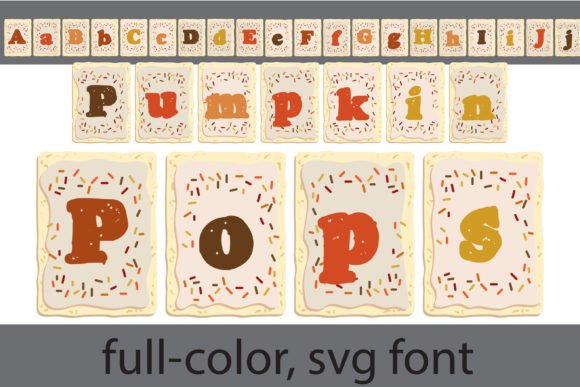
Imagine a font that doesn’t just spell out words but paints them in the warm, inviting hues of a fall harvest. Pumpkin Pops is exactly that—a vibrant, full-color display font designed to capture the cozy, playful spirit of autumn. Its unique toaster pastry-inspired letterforms are filled with a rich pumpkin color palette, instantly evoking feelings of warmth, nostalgia, and seasonal charm. For designers, crafters, and business owners, this isn’t just another typeface; it’s a dynamic design asset ready to transform your projects with its bold personality and visual appeal.
A Font Built for Visual Impact
What sets Pumpkin Pops apart in a sea of creative fonts is its nature as an OpenType full-color (SVG) font. This technology allows each letter to contain multiple colors and gradients, moving far beyond the limitations of traditional single-color typefaces. The result is a font that looks hand-painted and textured, perfect for projects where a standard serif or sans serif font might feel too flat or corporate. Its playful, rounded shapes make it exceptionally legible at larger sizes, ensuring your message is communicated clearly while still bursting with character.
It’s important to understand how color fonts work to use them effectively. Pumpkin Pops will appear as a solid black silhouette in software that doesn’t support SVG fonts, such as older versions of Microsoft Word or some basic design tools. However, in compatible programs—like Adobe Illustrator, Photoshop, Silhouette Studio, QuarkXPress, and Inkscape—you’ll see the full, glorious color. The font installs like any other .OTF file, but the magic happens when you type in a supported environment and watch those pumpkin shades come to life on your canvas.
Practical Applications for Seasonal and Year-Round Projects
The true value of a premium font like Pumpkin Pops lies in its versatility. While it’s an obvious star for fall-themed projects, its applications extend far beyond October.
For Branding and Logo Design: If your business has a cozy, artisanal, or family-friendly vibe, Pumpkin Pops can be a cornerstone of your brand identity. Think of a bakery’s logo, a farm-to-table restaurant’s menu header, or the branding for a children’s autumn festival. It helps build immediate brand recognition through its distinctive, memorable look. Pair it with a clean sans serif font for body text to balance its exuberance and maintain readability.
Packaging and Product Design: Stand out on the shelf or in an online store. Use Pumpkin Pops for product names on seasonal packaging—think gourmet pumpkin butter, fall-spiced candles, or Halloween treat boxes. The font’s built-in color reduces the need for complex printing setups while delivering a high-end, custom feel.
Marketing and Social Media Graphics: Capture attention in a crowded feed. A social media post, Instagram story, or Facebook ad featuring a headline in Pumpkin Pops is inherently more engaging than one with plain text. It’s perfect for promoting sales, events, or seasonal content. The font’s personality does much of the marketing work for you, conveying a mood instantly.
Print and Digital Materials: Elevate your invitations, posters, and digital products. Wedding invitations for an autumn ceremony, school harvest dance posters, or downloadable planner pages and worksheets can all benefit from its festive touch. For editorial design, use it sparingly for pull quotes or section headers in a magazine or blog to inject a dose of creativity.
Merchandise and Crafts: This is where Pumpkin Pops truly shines for crafters and entrepreneurs using platforms like Silhouette Studio. Design custom t-shirts, tote bags, mugs, and home décor items with ease. The font’s compatibility with popular cutting and design software makes it a go-to asset for creating products to sell on Etsy or at local craft fairs.
Making the Most of Your Creative Font
To use Pumpkin Pops effectively, think of it as a display or headline font, not for long paragraphs of body copy. Its strength is in titles, logos, and short, impactful phrases. Here’s how to integrate it seamlessly into your workflow:
Test Before You Commit: Always test the font in your final design program. Type out your text to confirm you’re seeing the full color version. This simple step avoids surprises later in the production process.
Master Font Pairing: Balance is key in modern typography. Pair the bold, colorful Pumpkin Pops with a neutral, highly legible typeface for supporting text. A simple sans serif like Montserrat or a classic serif like Lora can provide a clean foundation that lets your headline font stand out without overwhelming the viewer.
Consider Readability and Hierarchy: Use font size and weight to create a clear visual hierarchy. Let Pumpkin Pops dominate as your primary H1 or logo element, then step down in size and style for subheadings and body text. This guides the viewer’s eye and makes your design more professional and easier to navigate.
Review All Included Styles: Many premium font families include alternates or stylistic sets. Explore the character map in your system to see if Pumpkin Pops includes additional glyphs or color variations. This can give you even more creative flexibility to customize your designs.
Understand Licensing: Before using the font for commercial projects—like selling merchandise or client work—ensure you have the correct commercial license. This is a standard and crucial step with any commercial font asset to protect both you and the font creator.
Pumpkin Pops is more than just a seasonal novelty; it’s a versatile tool for adding instant personality and professional polish to a wide array of creative projects. By understanding its capabilities and using it strategically, you can harness its vibrant energy to create designs that resonate, engage, and leave a lasting impression.