Paperclipped Pumpkin: A Playful Font for Autumn Projects
There's something undeniably charming about autumn—the crisp air, the warm colors, and that cozy feeling that makes you want to create. If you're working on seasonal projects, fall-themed branding, or just want to inject some warmth into your designs, the right typeface can make all the difference. That's where Paperclipped Pumpkin enters the picture, offering a unique blend of whimsy and seasonal flair that's hard to ignore.
What Makes This Font Stand Out
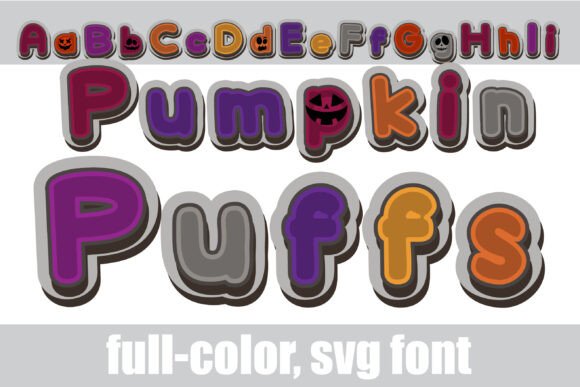
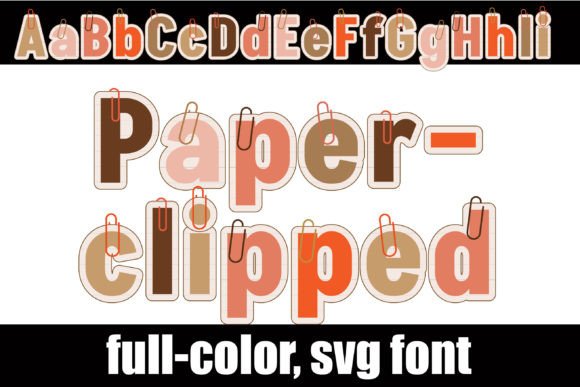
At first glance, Paperclipped Pumpkin catches your eye with its distinctive paper-style letterforms accented by decorative paperclips woven into the characters. The autumn color palette—think burnt oranges, deep reds, golden yellows, and rich browns—gives each letter an instant seasonal personality. It's the kind of typeface that doesn't just sit on a page; it tells a story before anyone even reads the words.
What's particularly interesting is the inclusion of an alternate case with additional color variations accessible through your system's character map. This means you're not locked into one look. You can experiment with different color combinations within the same font family, giving your projects more range than you might expect from a seasonal display font.
As an OpenType full-color SVG font, Paperclipped Pumpkin renders in vibrant color across compatible applications. However, it's worth noting that color fonts will appear as black in programs that don't support this technology. If you're unsure whether your software can handle it, simply type out some text and check whether the colors appear. Programs like Adobe Illustrator, Photoshop, InDesign, Silhouette Studio, Quark, and Inkscape all support full-color SVG fonts at this time.
Where This Font Truly Shines
Paperclipped Pumpkin works best as a display or headline font rather than body text. Its playful, textured character makes it ideal for projects where you want to grab attention quickly. Think about the titles on fall festival posters, the headers on autumn-themed social media graphics, or the bold text on seasonal packaging. In these contexts, the font does exactly what a good display typeface should—it draws the eye and sets the mood instantly.
For small business owners running seasonal promotions, this font offers a ready-made aesthetic. A coffee shop launching a pumpkin spice menu, a boutique advertising fall merchandise, or a bakery promoting Thanksgiving treats could use Paperclipped Pumpkin on their marketing materials and immediately communicate the seasonal theme without needing elaborate design work. The font itself carries the visual weight of autumn.
Crafters and hobbyists will find it equally useful. If you're designing custom invitations for a fall gathering, creating labels for homemade goods, or working on scrapbook layouts, this typeface adds personality without requiring advanced design skills. It's also compatible with Silhouette Studio, making it accessible for those who work with cutting machines and vinyl projects.
Pairing and Practical Considerations
One of the most important things to remember with any decorative display font is that it needs the right partner. Because Paperclipped Pumpkin has such a strong visual personality—paperclips, textured letterforms, bold colors—it pairs best with clean, simple typefaces for body copy. A straightforward sans serif font or a classic serif typeface will provide the contrast needed to keep your designs balanced and readable.
Imagine a fall event poster where the title uses Paperclipped Pumpkin in its warm autumn palette, while the event details—date, time, location, ticket information—are set in a neutral, legible typeface. The title catches attention from across the room, and the supporting text delivers the information clearly. That's effective typography in action.
When choosing font pairings, test them together before committing. What looks good in isolation might clash when placed side by side. Print out a sample or view it at actual size on screen. Check that the decorative font doesn't overwhelm the supporting text, and make sure the overall composition feels cohesive rather than chaotic.
Installation and Compatibility
Getting Paperclipped Pumpkin onto your system is straightforward. Like any standard .otf font file, you install it through FontBook on Mac or through your preferred font manager or the Control Panel on Windows. Once installed, it appears in your font menus just like any other typeface.
The key thing to remember about full-color SVG fonts is their behavior in different environments. They often display as black in font preview windows, even in programs that fully support them. Don't let that fool you. Once you actually type and render the text on your canvas or document, the colors should appear correctly in compatible software. If they don't, your program likely doesn't support color font technology, and you'll see a monochrome version instead.
For designers working across multiple platforms, this compatibility factor is worth considering during the planning phase. If your final output will be in a program that doesn't support color fonts, you might need to convert the text to outlines or rasterize it to preserve the color information. Planning ahead saves headaches later.
Thinking Beyond Autumn
While the name and palette clearly evoke fall, creative professionals often find ways to repurpose seasonal assets year-round. The paperclip motif in Paperclipped Pumpkin, for instance, could work for office supply branding, stationery designs, or organizational product marketing regardless of season. If you adjust your color choices through the alternate case options, you might find applications that extend well beyond October and November.
This kind of versatility is what separates a useful design asset from a one-note novelty. A font that can serve multiple purposes across different projects offers better long-term value, especially for designers and business owners who need to maximize their creative toolkit.
Final Thoughts on Using Display Fonts Effectively
Choosing the right typeface is about more than aesthetics—it's about communication. A font like Paperclipped Pumpkin communicates warmth, playfulness, and seasonal awareness in a way that plain text simply cannot. When used thoughtfully, it becomes part of your brand's visual language, helping your audience immediately understand what you're about and what feeling you want to evoke.
The best approach is to treat decorative fonts as strategic design choices rather than default options. Use them where they amplify your message. Pair them with complementary typefaces that handle the heavy lifting of readability. Test your designs at the sizes and in the formats where they'll actually appear. And always make sure your font licensing covers your intended use, whether that's personal projects or commercial applications.
With its distinctive paper-clip detail, warm autumn palette, and full-color SVG technology, Paperclipped Pumpkin offers a creative starting point for designers, marketers, and hobbyists who want their fall projects to feel intentional and visually engaging. It's one of those design assets that, when used in the right context, makes the work feel just a little more polished and a lot more fun.