Leafy Cut Outs: A Playful Typeface for Seasonal Designs
There's something instantly recognizable about the tactile, imperfect charm of construction paper crafts. That layered, cut-out aesthetic carries a sense of warmth and handmade authenticity that digital designs often struggle to replicate. This is precisely why a typeface like Leafy Cut Outs stands out. It’s not just another font; it’s a design asset that brings the cozy, autumnal feeling of a paper craft project directly into your digital toolbox. For creators working on seasonal campaigns, children’s content, or any project that needs a dose of organic whimsy, understanding how to use this unique SVG font can transform your work from standard to standout.
Understanding the Craft: What Makes This Font Unique
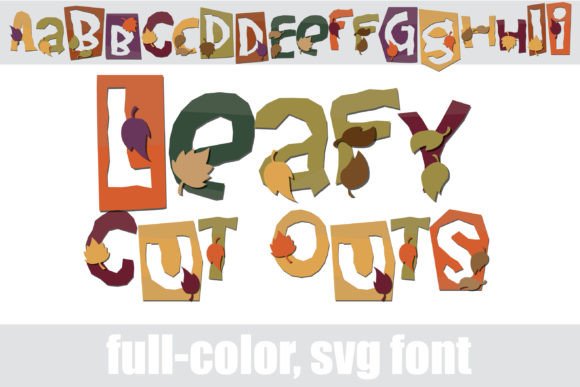
At its core, Leafy Cut Outs is a full-color (SVG) font. Unlike traditional typefaces that are single-color vector outlines, SVG fonts can contain multiple colors, gradients, and even textures directly within each glyph. This particular font mimics the look of letters cut from paper, complete with a rich autumn color palette and integrated leaf motifs. The visual result is a layered, textured appearance that feels handcrafted and seasonal.
A critical detail for any designer is understanding its technical behavior. This premium font is installed like any standard .OTF file, typically via FontBook on a Mac or your system's font manager on Windows. However, its color properties have a key limitation: color fonts will show as black in non-compatible programs. This is common with SVG fonts. You’ll know your software supports them when you see the colors render live on your canvas. Programs like Adobe Illustrator, Photoshop, Silhouette Studio, QuarkXPress, and Inkscape are known to support full-color SVG fonts. In many applications, the font may appear black in the preview window or font menu but will display in full color once you actually type with it. This makes testing in your specific workflow an essential first step.
Practical Applications: Where Paper-Cut Charm Meets Modern Design
The true value of a creative font like this lies in its application. Its construction-paper style isn't just decorative; it communicates specific tones and themes. Here’s how different professionals can leverage it:
- Branding & Logo Design: For businesses with a focus on nature, eco-friendliness, artisanal goods, children's products, or autumnal themes, Leafy Cut Outs can serve as a distinctive display font in a logo or wordmark. It instantly conveys a brand personality that is approachable, seasonal, and authentic.
- Packaging & Merchandise: Imagine this font on labels for a fall candle, a harvest festival poster, or merchandise for a nature-themed blog. Its textured, tactile quality makes it perfect for physical products where you want to evoke a handmade feel.
- Social Media & Digital Content: In a crowded feed, a post title or quote set in a full-color, textured font grabs attention. Use it for Instagram graphics, Pinterest pins, or YouTube thumbnails related to DIY, gardening, cooking with seasonal ingredients, or holiday content.
- Print & Editorial: This isn't a body text font. Its strength is in headlines, pull quotes, or chapter titles in magazines, newsletters, or book covers, especially for genres like children's books, seasonal cookbooks, or nature writing.
- Invitations & Event Materials: Fall weddings, harvest parties, or children's autumn birthdays are perfect candidates. The font sets a thematic tone before guests even read the details.
Integrating the Font: Tips for Effective and Professional Use
Using a bold, thematic font effectively requires more than just dropping it into a design. A few practical considerations will ensure your projects remain polished and readable.
Font Pairing is Key. Leafy Cut Outs is a high-personality display font. It needs a quiet partner. Pair it with a clean, neutral sans serif font or a classic serif font for any body text or supporting information. For example, use Leafy Cut Outs for a main headline, and pair it with a font like Open Sans or Lora for subheadings and paragraphs. This creates visual hierarchy and ensures your message remains clear.
Prioritize Readability. Because of its detailed, textured nature, this font works best at larger sizes. Avoid using it for small text, long sentences, or critical information where clarity is paramount. Its ideal role is for short, impactful words or phrases—titles, single-line headers, and callouts.
Review the Included Glyphs. The font description mentions an alt case with additional colors accessible via your system's character map. This is a valuable feature. Before finalizing a design, explore the full character set. You might find alternate leaf placements or color variations that better suit your project's color scheme, giving you more creative flexibility within the same typeface.
Consider Commercial Licensing. If you're using this font for client work, merchandise for sale, or any commercial project, ensure you have the correct license. Most commercial font licenses are straightforward, but it's a non-negotiable step to avoid legal issues down the line.
Beyond Autumn: Thinking Thematically with Typography
While the autumn palette is its signature, the underlying concept—a textured, layered cut-out style—can inspire designs beyond just fall themes. The technique of using full-color SVG fonts is part of a larger trend in modern typography that adds depth and personality. By focusing on the font's core character—its playful, crafted, organic feel—you can adapt it for projects centered on nature, recycling, childhood creativity, or handmade goods throughout the year. The key is to let the typography do more than just present words; let it help tell the story and define the brand identity. When chosen thoughtfully, a typeface like Leafy Cut Outs becomes more than a design asset—it becomes a strategic tool for visual communication that resonates on a sensory level.