Infuse Festive Charm into Your Designs with Christmasberry
There’s a unique magic in holiday design that goes beyond red and green palettes. It’s in the textures, the playful details, and the typography that captures the spirit of the season. For designers and creators seeking to evoke that cozy, celebratory feeling, the Christmasberry font offers a distinct and visually rich solution. This isn't just another seasonal typeface; it's a creative tool designed to bring a burst of festive personality to a wide range of projects.
A Typeface That Celebrates the Details
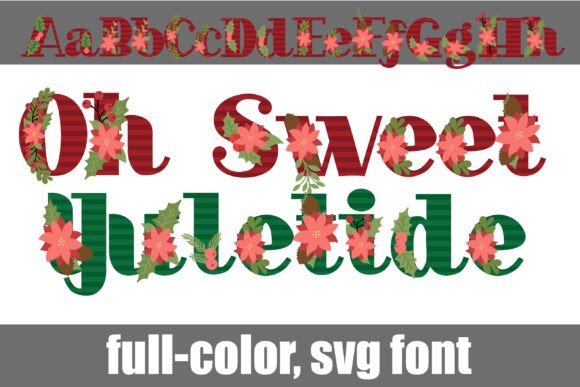
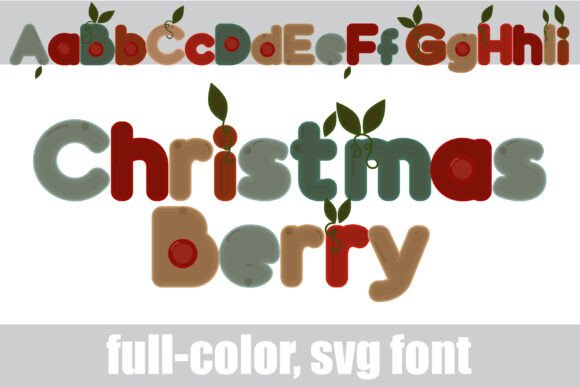
Christmasberry is a chunky sans serif that immediately commands attention with its bold, friendly presence. What sets it apart are the delicate Christmas berries and leaves woven throughout each character. These organic elements are integrated seamlessly, transforming simple letters into decorative statements. The font comes in a full-color (SVG) version, meaning the berries appear in vibrant reds and greens right out of the box. For even more versatility, an alternate version accessible through your system’s character map provides a broader palette of colors, allowing you to customize the look to match any brand or project aesthetic.
This premium font is engineered for impact. Its primary strength lies in display settings—think titles, headers, and logos where readability at a glance is paramount. The chunky letterforms ensure clarity, while the festive details add a layer of charm that plain text simply can't achieve. It’s a perfect example of modern typography that balances decorative flair with functional design.
Practical Applications for the Festive Season and Beyond
The true value of a creative font like Christmasberry lies in its application. Its unique character makes it a versatile asset across numerous mediums, helping you create cohesive and engaging visual stories.
- Branding & Logo Design: For bakeries, boutique gift shops, holiday pop-up stores, or event planners, Christmasberry can form the cornerstone of a seasonal brand identity. A logo set in this typeface instantly communicates a festive, approachable, and artisanal vibe.
- Packaging & Merchandise: Imagine holiday cookie boxes, coffee bags, or candle labels adorned with this font. It adds perceived value and a handmade feel that resonates with consumers looking for special gifts. It’s equally effective on merchandise like tote bags, ornaments, and apparel.
- Print & Digital Invitations: Create standout invitations for holiday parties, winter weddings, or corporate galas. The font’s personality sets the tone immediately, promising a celebratory event.
- Social Media & Marketing: In a crowded digital space, distinctive typography helps your content stop the scroll. Use Christmasberry for Instagram story headers, sale announcements, email newsletter banners, and promotional graphics to boost audience engagement and reinforce your brand recognition.
- Editorial & Web Design: Blogs covering holiday recipes, DIY decor, or gift guides can use this font for chapter headings or pull quotes to enhance the visual consistency of their content. It’s also perfect for creating eye-catching website banners for seasonal sales.
Working with SVG Color Fonts: A Practical Guide
As a full-color SVG font, Christmasberry requires a specific workflow, but the payoff is worth it. Understanding how to use it ensures you get the beautiful, multi-colored results it’s designed to deliver.
Installation is straightforward: Install the .OTF file just like any other font. On a Mac, this is typically done via FontBook; on Windows, use the Control Panel or a preferred font manager.
Compatibility is key: The most important thing to remember is that color fonts will show as black in non-compatible programs. This is a technical limitation, not a flaw in the font. You’ll know your software supports it when you type and see the colorful berries. Programs like Adobe Illustrator, Photoshop, Silhouette Studio, QuarkXPress, and Inkscape currently support full-color SVG fonts. Always test the font within your document before finalizing a design.
Leveraging the alt version: Don’t overlook the alternate character set. Accessing it through your system’s character map (or glyph panel in design software) unlocks additional color options for the letters. This feature is invaluable for matching the font precisely to a client’s brand colors or your project’s specific palette, elevating it from a seasonal novelty to a customizable design asset.
Making It Work for Your Project
Choosing the right typeface is about matching personality to purpose. Christmasberry excels in projects where warmth, celebration, and a touch of whimsy are desired. It’s less suited for long paragraphs of body text but shines brilliantly in short, impactful applications.
Consider font pairing carefully. To maintain professional presentation and readability, pair Christmasberry with a clean, neutral sans serif or a classic serif for supporting text. This creates a hierarchy that guides the viewer’s eye and prevents visual clutter. For instance, a bold Christmasberry headline followed by a simple sans serif body copy creates a balanced and attractive layout.
Before committing to a large project, always review the included font styles and test them in your intended environment. Check how the colors render in your specific design software and consider how the font will look in both digital and print contexts. For commercial use, ensure you are clear on the licensing terms provided with the font to use it appropriately for client work or merchandise.
Ultimately, Christmasberry is more than just a display font