Green Grind: A Floral Serif Font for Bold Branding
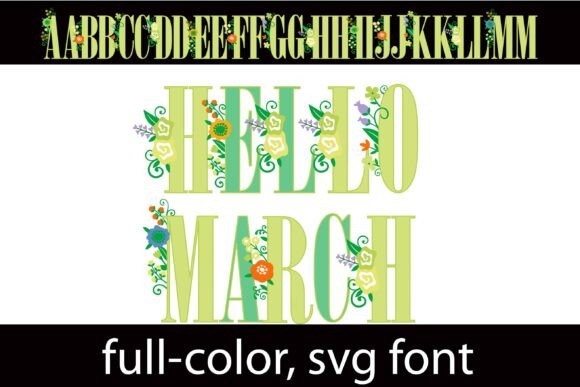
There’s a moment in every design project where the typeface either disappears into the background or steps forward to own the stage. If you are working on a project that demands nature-inspired elegance mixed with bold visibility, you need a typeface that doesn't just sit there. You need something with personality, texture, and color. This is where the Green Grind display font enters the conversation. It is not just another set of letters; it is a full-color SVG font designed to mimic the intricate beauty of a green garden, featuring a classic serif structure adorned with delicate florals on the uppercase characters.
For designers, entrepreneurs, and content creators, the struggle is often finding an asset that feels premium without requiring hours of custom illustration. Standard serif fonts are reliable, but they often lack the "wow" factor needed for a hero image or a standout logo. Green Grind solves this by embedding high-definition floral elements directly into the letterforms. Imagine the letter "A" constructed from dark green foliage, with soft petals blooming at the apex. This isn't a flat vector approximation; because it is an SVG (Scalable Vector Graphics) font, it supports high-resolution color and transparency data. This allows for gradients, shading, and realistic textures that standard TrueType or OpenType fonts simply cannot render.
The Visual Power of Full-Color Typography
When we talk about modern typography, we are often discussing minimalism—clean lines, plenty of white space, and sans-serif neutrality. While that works for body text, it doesn't always capture the essence of a brand focused on organic products, botanical themes, or eco-friendly services. Green Grind breaks the mold by utilizing a rich green color palette that feels alive.
The visual appeal lies in the contrast between the rigid structure of a serif font and the organic randomness of floral elements. Serifs imply tradition, authority, and stability. Florals imply growth, nature, and creativity. When you combine them, you get a typeface that feels established yet vibrant. This makes it an ideal premium font for businesses that want to convey trustworthiness while also showing they care about the environment or aesthetics.
It is important to understand how this font functions technically. Because it is a color font, the green and floral details are baked into the file. You do not need to layer multiple text boxes or apply complex clipping masks to get the look. You simply type, and the design appears. However, a key technical note for creators: color fonts generally appear as a solid black silhouette in older or incompatible software. This is a standard limitation of SVG font technology, not a flaw in the design itself. Always ensure your software supports SVG color fonts before purchasing or starting your workflow.
Practical Applications for Creators and Businesses
The versatility of a display font like this is surprisingly broad, provided you use it for the right contexts. Because the letterforms are detailed, this is not a typeface for writing a 500-word blog post. It is a headline font, a poster font, and a branding font. Here is how different professionals can leverage this specific style.
Branding and Logo Design
For small business owners in the wedding industry, floristry, or sustainable goods, a logo sets the tone immediately. A sans-serif font might look too tech-focused, and a script font might be too difficult to read at small sizes. Green Grind offers a middle ground: it is legible, structured, and visually rich. If you are creating a logo for a botanical garden or an organic skincare line, this font serves as a complete design element on its own. You might not even need additional graphics; the typography is the illustration.
Packaging and Merchandise
Think about the shelf presence of a product. A tea tin, a candle box, or a tote bag needs to catch the eye in seconds. Using a full-color SVG font for the product name on packaging can create a tactile, luxurious feel. For merchandise like t-shirts or mugs, the high-resolution nature of the font ensures the print looks crisp and professional, avoiding the pixelation issues that plague standard fonts when scaled up.
Digital Assets and Social Media
In the scroll-stopping world of Instagram and Pinterest, visual distinctiveness is currency. Content creators can use Green Grind for Instagram Story headers, Pinterest pin titles, or YouTube thumbnails. The green palette naturally evokes freshness, which is excellent for food bloggers, fitness influencers, or lifestyle accounts focusing on wellness. It provides a cohesive look that helps build brand recognition across different platforms.
Editorial and Web Design
While it won't replace your body text font (like a clean sans-serif), it is perfect for the "hero" section of a website. Web designers can use it for the main
tag on a landing page to immediately communicate the site's vibe. In editorial design, such as magazine covers or digital e-book headers, it adds a layer of sophistication that standard black text cannot achieve.
Improving Brand Identity and Engagement
Typography is silent communication. The fonts you choose tell your audience how to feel about your brand before they read a single word of your copy. Using a typeface like Green Grind helps improve brand recognition because it is highly distinctive. People remember visual anomalies; a font that looks like it is made of leaves and petals is much harder to forget than a standard Helvetica or Arial header.
Furthermore, this font aids in visual consistency. By using a specific, stylized font for all your headers and titles, you create a visual anchor. When a customer sees that specific shade of green and those floral serif shapes, they immediately associate it with your brand identity. This consistency builds trust, and trust leads to higher audience engagement.
There is also the aspect of professional presentation. In a crowded market, looking "homemade" can be a disadvantage. Using high-quality design assets signals that you invest in your business. It shows attention to detail. Whether you are selling digital downloads on Etsy or pitching a client, the polish of your typography affects how your work is perceived.
Design Strategy: Pairing and Placement
To get the most out of Green Grind, you need to think about context and pairing. A display font rarely works in isolation. It needs a partner to handle the heavy lifting of body copy.
Choosing the Right Pairing
Because Green Grind is ornate, textured, and colorful, your secondary font should be the opposite: clean, simple, and neutral. A geometric sans-serif or a simple humanist sans-serif works best here. Avoid pairing it with a script font or another heavy serif, as this will create visual chaos. The goal is hierarchy. Let the floral font be the star, and let the body font be the supporting actor. For example, pairing it with a light-weight sans-serif for subtitles and body text allows the green florals to pop without overwhelming the reader.
Readability and Sizing
SVG fonts often have a "sweet spot" regarding size. If you make them too small, the intricate floral details can turn into a muddy blur, especially on lower-resolution screens. This font works best for titles, displays, and posters. Use it large. Let the details breathe. If you are using it on a website, test it on mobile devices to ensure the uppercase florals don't lose their definition on smaller screens.
Color Management
While the font comes in a preset green palette, advanced users might want to explore the "alt" version mentioned in the font details. Many premium color fonts include alternate character sets accessible through your system's character map. These versions might offer different color combinations or simplified styles. However, keep in mind that you generally cannot change the color of an SVG font via the text color picker in your software because the color data is embedded in the vector paths. You use the font as-is for the best results.
Technical Considerations for a Smooth Workflow
Before you finalize your project, there are a few logistical points to consider to ensure your design process goes smoothly.
- Software Compatibility: As noted, this font is compatible with Silhouette Studio, which is great for crafters making vinyl decals or heat transfers. It also works in major design software like Adobe Photoshop, Illustrator, and InDesign, provided you are using recent versions that support SVG color fonts. It works on macOS and Windows systems as well.
- File Formats: Ensure you are installing the correct file type. Usually, SVG fonts come in an .OTF or .TTF container that holds the SVG data. If you install the file and it looks black, check your software’s capabilities first.
- Licensing: Always review the commercial licensing terms. If you are using this font for a client project or selling merchandise, you need to ensure the license covers "commercial use." Most premium fonts allow this, but it is the designer's responsibility to verify the terms to avoid legal headaches down the road.
Ultimately, Green Grind is more than just a typeface; it is a design solution for anyone looking to inject organic vitality into their work. It bridges the gap between traditional typography and modern illustration, offering a tool that saves time while elevating the aesthetic quality of any project it touches. Whether you are branding a new eco-startup or designing a wedding invitation suite, this font provides the visual texture needed to make a lasting impression.